
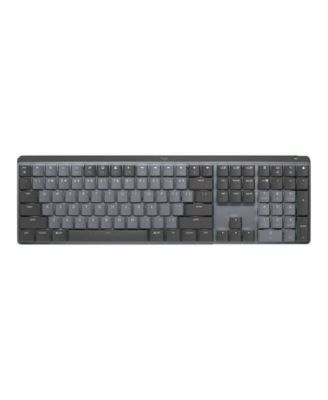
LogitechMX Mechanical Wireless Illuminated Tactile-Quiet Full-Size Keyboard for Multi-OS
Product Details
- Experience a quieter way to work with this Logitech keyboard, featuring Tactile Quiet switches that provide a responsive feel without the distraction of loud clicking. The full-size layout includes an integrated numpad to support better ergonomics, while the keys automatically illuminate to match your lighting conditions. Seamlessly connect across multiple operating systems with Bluetooth or USB-C for a reliable desktop setup.
Features
- Full-size wireless mechanical keyboard
- Multi-device, multi-OS connectivity via Bluetooth Low Energy and USB-C recharging
- Matte surface keys; dual-color keycaps
- Multi-OS compatibility
- Integrated Numpad with a design that promotes better posture and improved ergonomics
- Backlit keys automatically adjust to suit changing lighting conditions
- Tactile Quiet switches deliver an incredible mechanical feel with less feedback noise
- This product will be delivered by Standard Ground Shipping and is not eligible for Premium or Overnight Shipping.
- WARNING: Do not use any power adapter, charger, or cords other than those included with your product. Using incompatible, counterfeit, or noncertified accessories can cause fire or accidents. Contact the manufacturer for replacements.
- Imported
Shipping & Returns
- This item qualifies for Free Shipping with minimum purchase! exclusions & details
- Orders will not ship in Macy’s packaging.
- Enjoy a longer window to return most of your holiday purchases. See our Extended Holiday Return Policy to see if this item qualifies.
- This item may not be shipped to Alaska, American Samoa, Guam, Hawaii, Marshall Islands, U.S. Virgin Islands, Puerto Rico, Palau, or the Pacific Islands.
- This product will be delivered by Standard Ground Shipping and is not eligible for Premium or Overnight shipping.
- This item has a lithium battery. Return requires a hazmat label and special packaging. If there's an issue, bring the item in store for help with your return.
- California and Minnesota customers call 1-800-289-6229 for Free Shipping information.
Your security is our number one concern.To report suspicious activity, please reach out to Macy's at 1-800-289-6229 or click here to report online.
- Web ID: 18773517
308 reviewssorted by Newest
Squeaky Shift Key
Overall, the keyboard is good. But the left shift key squeaks horribly every time it is pushed.
Customer review from Logitech
Response from Logitech
Thanks for letting us know about your experience with the MX Mechanical - Graphite. We’ll pass this along to our product team, and our support team would be happy to assist you further at socialcare@logitech.com
Great
This is a premium quality keyboard, it was everything that I expected
Recommends this product
Customer review from Logitech
Response from Logitech
Happy to hear the MX Mechanical lived up to your premium expectations! We built it to combine quality, performance, and style seamlessly. Thanks for recognizing the effort that goes into delivering a top-tier keyboard experience!
Love the feel but it’s laggy
Love the feel but it’s laggy. It seems to have trouble between my work and personal HP, via the bolt on a common dock
Customer review from Logitech
Response from Logitech
We appreciate your thoughts on the Logitech MX Master 3S Bluetooth Edition. While it’s great to hear the feel works for you, we’re sorry the latency through Bolt on your HP dock isn’t meeting expectations. To help us dig deeper and resolve this, please connect with our Social Care team at socialcare@logitech.com and share: Name Email Address Country Brief summary of the issue This way, our team can review your setup and provide tailored support. Your feedback helps us refine the experience for every user.
The Sleekest Mechanical Keyboard
Superb, just as advertised. Smooth keyboard. Keep it up Logitech Team!!!
Recommends this product
Customer review from Logitech
Response from Logitech
Thanks a ton for the awesome shoutout! We're thrilled to hear that the Logitech MX Mechanical is hitting all the right notes for you. Smooth typing and sleek design are exactly what we aim for, and your feedback made our day.
Great feeling keyboard, not good for corporate com
No print screen button is causing me to return the keyboard. My company locks out most 3rd party software and I cannot use the required Logitech software.
Customer review from Logitech
Response from Logitech
Appreciate you sharing your experience with the MX Mechanical. The typing feel is clearly a highlight, but we understand how the absence of a Print Screen key and the need for software can make it tough in a corporate setup where restrictions are in place. Feedback like yours helps us see where the product doesn’t align with certain work environments, and it’s valuable for our team to hear.
60 Words Per Minute, 25 errors to fix
My error rate keyboarding is higher withe this keyboard that the previous Logitech keyboard. I don't like how the keys are labeled in the number row with the numbers next to the uppercase component but that is not the reason for the error rate. I think this keyboard is smaller.
Customer review from Logitech
not what it should be
i dont like the way the keyboards feel -- there seems to be too much resistance that creates stress on the fingers. Furthermore, i find the keys to be too loud, and I am using the linear board. I would have imagined with todays technology, i would be able to modify the key's sensitivity.
Customer review from Logitech
Nice Keyboard but worth the price?
The first keyboard I ordered came damaged. The whole return and repurchase situation was not the best to work through, but I did eventually receive my keyboard. The backspace button doesn't seem to work as well as my tried and true K540/K545. I find myself having to click it with more force than any other key to make sure it actually registers. Due to the whole fiasco of having to return and repurchase, I haven't reached out to support. Overall, it's a decent keyboard but I don't feel the value matches the price.
Customer review from Logitech
Response from Logitech
Having a key that requires extra pressure to register is certainly not the expected experience. Please reach out via email to socialcare@logitech.com so support can assist directly with getting that backspace key working properly. Reassurance is top priority, and assistance is available to make things right.